GitHub for Beginners: Everything You Need to Know to Start Using Version Control
If you’re new to development, one of the best skills you can pick up early is version control, and GitHub makes it incredibly approachable.

If you are new to development, one of the best skills you can pick up early is version control—and there’s no better place to start than GitHub. Whether you’re building your first project or collaborating with others, GitHub gives you a simple, powerful way to track changes, manage code, and work like a professional developer from day one. It not only helps you keep your projects organized, but also teaches you the workflow used by real software teams across the world. Learning GitHub early sets the foundation for smoother collaboration, cleaner code management, and a more confident development journey ahead.
I’ve gone through countless “How to GitHub” tutorials, but honestly, the best way to learn GitHub is by actually using it in your workflow. I learned GitHub by doing, breaking things, fixing them, and repeating the cycle. In this post, I’ll share how I learned GitHub practically, and give you a simple guide you can follow. I’ll also cover the best practices most tutorials never mention but every developer should know.
For getting started, you can follow “Git and GitHub for Beginners” by freeCodeCamp. Once you complete that tutorial, you’ll be comfortable with the basic Git features, essential commands, and how to create repositories for your projects.
After your repo is created and you’ve made your initial commits, here are the steps I personally follow to use GitHub properly :
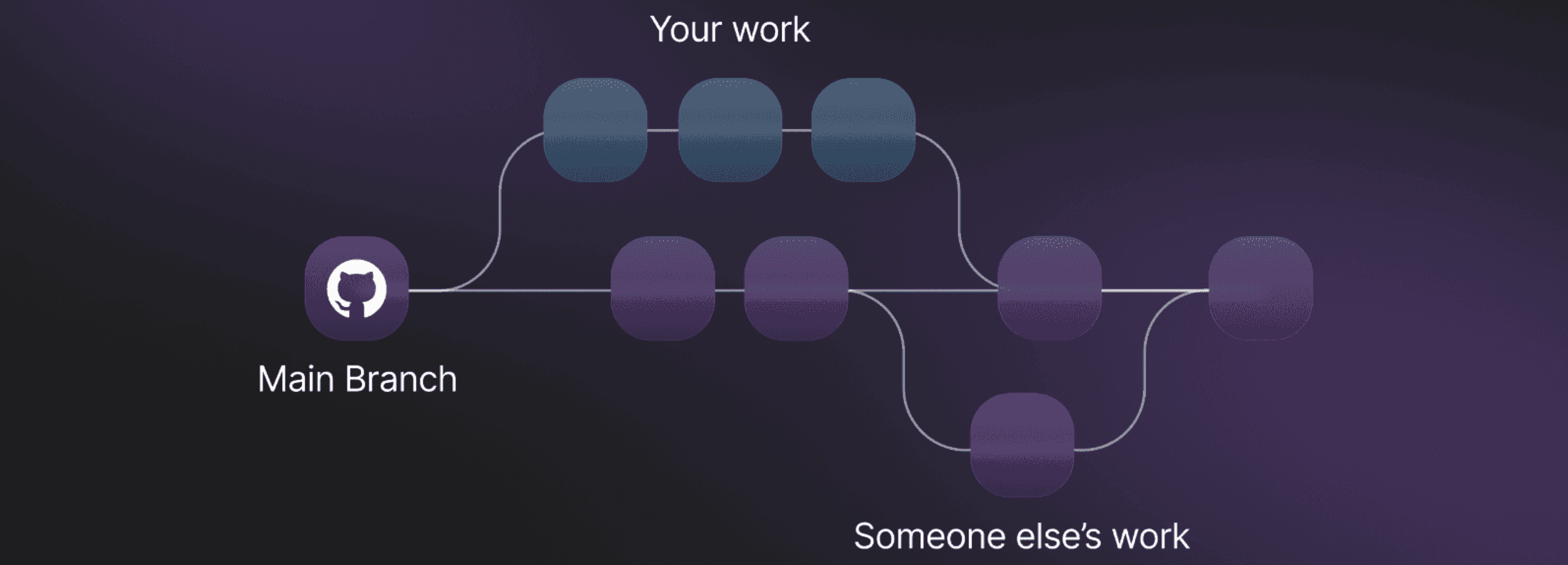
1. Create a new branch for every feature:
Never work directly on main. This helps you stay organised and prevents breaking your stable code. Lorem ipsum dolor sit, amet consectetur adipisicing elit. Neque similique vel ducimus repellat sint ipsum deserunt illo numquam, asperiores molestiae.
2. Write meaningful commit messages:
Instead of “fix” or “update,” write what you changed and why. It helps a lot when you revisit your code weeks later. Lorem ipsum dolor, sit amet consectetur adipisicing elit. Soluta dolorum alias sit ratione eius similique! Lorem ipsum dolor sit, amet consectetur adipisicing elit. Iste, ullam.
3. Push frequently:
Don’t wait till the end. Small, continuous pushes help you track progress and reduce merge conflicts. Lorem ipsum dolor sit amet consectetur adipisicing elit. Architecto numquam sunt pariatur! Quasi ducimus itaque debitis impedit beatae, quae voluptatibus?
Jan
Feb
Mar
Apr
May
Jun
Jul
Aug
Sep
Oct
Nov
Dec
Mon
Wed
Sat
4. Open Pull Requests even for your own projects:
PRs give you a clean view of what changed and make your workflow more professional. Lorem ipsum dolor, sit amet consectetur adipisicing elit. Soluta dolorum alias sit ratione eius similique! Lorem ipsum dolor sit, amet consectetur adipisicing elit. Iste, ullam.
5. Integrate AI code reviewers (like CodeRabbitAI) using GitHub Actions:
Automate review comments, get suggestions, and receive improvement tips on every pull request. This helps you learn clean coding practices faster and ensures you catch issues early even when you’re working solo.
6. Use Issues to track tasks:
Whether it’s bugs, ideas, or improvements. Create Issues and link them to commits/PRs. It’s how real teams work. Lorem ipsum dolor, sit amet consectetur adipisicing elit. Soluta dolorum alias sit ratione eius similique! Lorem ipsum dolor sit, amet consectetur adipisicing elit. Iste, ullam.
7. Write a clear and helpful README.md:
PRs give you a clean view of what changed and make your workflow more professional. Lorem ipsum dolor, sit amet consectetur adipisicing elit. Soluta dolorum alias sit ratione eius similique! Lorem ipsum dolor sit, amet consectetur adipisicing elit. Iste, ullam.